How RFID Hotel Lock Systems Work: From Key Cards to Electronic Door Locks
Modern hotels and resorts need a secure and practical way to manage guest room access.
Instead of relying only on traditional mechanical keys, many properties now use RFID hotel lock systems that combine electronic door locks, key cards, card encoders, and lock management software.
For guests, the process appears simple:
Check in → Receive a key card → Tap the card → Enter the room
Behind that simple interaction is a complete access system designed to control which credential can open a particular door and when that access should be valid.
For hotels and resorts in the Philippines, understanding how RFID hotel locks work can make it easier to evaluate new installations, replace older lock systems, and plan future integrations.
What Is an RFID Hotel Lock System?
RFID stands for Radio Frequency Identification.
In a hotel environment, RFID technology allows a compatible key card or credential to communicate with an electronic door lock over a short distance.
Unlike magnetic stripe cards, which are normally swiped through a reader, an RFID card is usually presented near the lock.
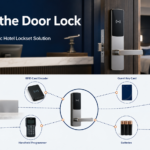
A basic hotel access system may include:
Hotel lock management software
RFID card encoder
RFID guest key cards
Staff access cards
Electronic hotel door locks
Mechanical override keys
Programming or maintenance tools
Depending on the selected system, additional features may include mobile access, energy-saving switches, audit records, or property management system integration.
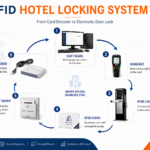
The Basic RFID Hotel Lock Workflow
A simplified hotel access workflow looks like this:
Hotel Lock Software → Card Encoder → RFID Key Card → Electronic Door Lock
Each component performs a different function.
The software defines the access.
The encoder prepares the card.
The RFID card carries the credential.
The electronic lock determines whether access should be granted.
Understanding these individual components makes the entire system easier to understand.
1. Hotel Lock Management Software
The process normally starts at the hotel front desk.
The lock management software is used to configure and manage guest and staff access.
Depending on the platform, authorized employees may use the software to:
Configure rooms
Create guest credentials
Create staff credentials
Set check-in and check-out access periods
Replace lost cards
Manage room changes
Configure lock information
Review available access records
For example, a guest may be assigned:
Room: 305 Check-in: September 27 Check-out: September 30 Credential type: Guest
The system then prepares the information needed for the guest’s RFID key card.
The exact information stored on the credential and how it is validated depends on the manufacturer and system architecture.
2. The RFID Card Encoder
After the room assignment has been prepared, the next step is the card encoder.
The encoder is commonly installed at the front desk and connects to the hotel lock software.
Its job is to prepare compatible RFID cards for use.
A typical check-in process might look like this:
The front desk employee selects the guest’s room.
The employee enters or confirms the access period.
A compatible RFID card is placed on or near the encoder.
The system prepares the card.
The card is given to the guest.
The encoder itself does not unlock the room.
It acts as the bridge between the management software and the physical RFID credential.
This is why the encoder, software, card technology, and door locks must all be compatible.
3. The RFID Hotel Key Card
Once encoded, the RFID card becomes the guest’s room access credential.
The guest normally holds or taps the card near the lock reader.
Depending on the system design, the credential may contain or reference information related to:
Room authorization
Credential type
Access validity
Hotel or system identification
Access permissions
The exact format varies between systems.
From the guest’s perspective, however, the process remains simple.
Present card → Lock reads credential → Access is approved or denied
RFID technology can also reduce some of the physical wear associated with older swipe-card systems because the card does not normally need to pass through a mechanical reader slot.
4. The Electronic Hotel Door Lock
The electronic lock is the final component in the guest access process.
When the RFID card is presented, the lock reads the credential and checks whether it meets the system’s access requirements.
Depending on the system, the lock may verify questions such as:
Is this a valid credential?
Is the credential assigned to this room?
Is the credential currently within its valid access period?
Does this credential have the required access permission?
If the credential is accepted, the electronic mechanism allows the door to be opened.
If the credential is not valid, access is denied.
This process typically happens in a matter of seconds.
How the Full Process Works During Hotel Check-In
Consider a guest arriving at a hotel.
Step 1: Room Assignment
The front desk assigns the guest to Room 305.
Step 2: Access Period
The guest’s stay is configured from the check-in date until the scheduled check-out time.
Step 3: Key Card Encoding
The front desk prepares an RFID key card using the compatible card encoder.
Step 4: Guest Receives the Card
The guest takes the card to Room 305.
Step 5: Card Is Presented to the Lock
The electronic lock reads the credential.
Step 6: Credential Is Verified
If the credential is valid for Room 305 and is within the allowed access period, the lock permits entry.
Not every electronic hotel lock requires continuous internet connectivity.
Many RFID hotel locks can validate compatible credentials locally at the door.
A simplified setup may operate like this:
Encoder → RFID Card → Electronic Door Lock
However, some modern systems may use additional network-connected or cloud-based services.
These can support capabilities such as:
Centralized administration
Remote management
Mobile credentials
Additional monitoring
Integration with other hotel platforms
Because architectures vary, hotels should ask the provider how the selected system behaves if network connectivity becomes unavailable.
RFID Hotel Locks and Property Management Systems
Some hotels may want the lock system to connect with a Property Management System (PMS).
A property management platform may manage:
Reservations
Guest records
Check-in
Check-out
Room assignments
Billing
Room status
When a compatible hotel lock solution supports integration, room assignments and credential issuance may become part of a more connected front desk workflow.
A conceptual architecture could look like:
PMS → Hotel Lock Software → Card Encoder → RFID Credential → Electronic Door Lock
However, integration should always be verified.
Not every electronic lock system is automatically compatible with every PMS.
Many hotel electronic locks use internal batteries.
This allows the lock to operate without running a dedicated power cable directly to every guest room door.
Hotels should understand:
Battery type
Recommended maintenance intervals
Low-battery warning behavior
Battery replacement procedures
Emergency procedures if the battery becomes depleted
Battery maintenance should be part of the hotel’s regular maintenance program.
Staff should not wait until a guest cannot enter a room before checking lock battery condition.
Emergency Access and Override Procedures
Electronic systems need fallback procedures.
Depending on the system, emergency access may involve:
Mechanical override keys
Emergency credentials
Handheld programming devices
Administrator access procedures
Hotels should define:
Who is authorized to use emergency access
Where override keys are stored
How emergency credentials are controlled
How emergency access is documented
The technology is only one part of hotel security.
Operational procedures are equally important.
What Should Hotels Check Before Choosing an RFID Lock System?
Before purchasing an RFID hotel lock solution, hotels and resorts should evaluate several areas.
Door Compatibility
Confirm:
Door material
Door thickness
Existing lock preparation
Handle orientation
Door frame condition
RFID Technology
Ask:
Which RFID technology is supported?
Which cards are compatible?
Are cards readily available?
Can guest and staff cards use different permissions?
Card Encoder
Confirm:
Which encoder is required?
How does it connect to the workstation?
How are replacement cards prepared?
Can multiple front desk stations use the system?
Management Software
Ask:
How are rooms configured?
How are guest cards created?
How are staff cards managed?
How are room changes handled?
What access records are available?
PMS Integration
If integration is required, confirm compatibility before installation.
Do not assume integration is available because both products are designed for hotels.
Maintenance
Understand:
Battery maintenance
Replacement parts
Lock servicing
Encoder support
Software support
Card supply
Future Expansion
Ask whether the system can support:
Additional rooms
New buildings
More encoders
Additional front desk stations
Mobile access
Future integrations
Common RFID Hotel Lock Mistakes to Avoid
Choosing Based Only on Lock Appearance
The lock must work with the door, software, cards, encoder, and hotel workflow.
Ignoring Door Compatibility
A lock that does not fit the existing door can create unnecessary installation work.
Buying Cards Before Confirming Compatibility
RFID cards must match the technology supported by the lock system.
Forgetting Staff Access Requirements
Hotels need to plan access for housekeeping, maintenance, supervisors, and management.
Assuming PMS Integration Is Automatic
Integration must be verified.
Ignoring Battery Maintenance
Battery-powered locks need routine maintenance.
Failing to Plan for Lost Cards
The hotel should have a documented procedure for issuing replacements and managing old credentials.
A Practical RFID Hotel Lock Checklist
Before implementation, confirm:
The door is compatible with the selected lock
The lock supports the required RFID technology
The correct card encoder is included
Guest cards are compatible
Staff credential permissions are defined
Lock management software is configured
Lost-card procedures are documented
Room-change procedures are clear
Battery maintenance is planned
Emergency access is available
PMS integration has been verified if required
Future room expansion has been considered
Technical support is available
A complete review can help prevent problems after installation.
Frequently Asked Questions
What does RFID mean in a hotel lock system?
RFID stands for Radio Frequency Identification. In a hotel lock system, it allows compatible cards or credentials to communicate with the electronic lock without requiring a traditional mechanical key.
How does an RFID hotel key card open a room?
The guest presents the RFID card near the lock. The lock reads the credential and checks whether it is authorized for that room and access period.
Can a hotel replace a lost RFID key card?
Usually, yes. A replacement credential can generally be prepared through the hotel’s lock management system. The exact method for invalidating the previous credential depends on the system.
Do RFID hotel locks require Wi-Fi?
Not necessarily. Many RFID hotel locks can validate credentials locally. Network requirements depend on the specific architecture and features being used.
Can staff use RFID cards too?
Yes. Many hotel lock systems allow separate staff credentials with different access permissions.
Can RFID locks integrate with hotel software?
Some systems can integrate with compatible hotel property management platforms. Compatibility should be confirmed before installation.
Can RFID hotel locks support mobile access?
Some compatible systems can support both RFID cards and mobile credentials. Additional hardware, software, or network services may be required.
RFID Hotel Access Is a Complete System
An RFID hotel lock should not be viewed as a standalone door accessory.
The complete access flow includes:
Hotel Lock Software + Card Encoder + RFID Credential + Electronic Door Lock + Staff Procedures + Maintenance
When these components work together properly, hotels can create a more structured way to manage guest room access.
Hotels and resorts considering an upgrade can also read:
For more information on how Above Infranet Solutions Inc can help you with How RFID Hotel Lock Systems Work: From Key Cards to Electronic Door Locks, please contact us at [0917 715 4189 (line 9177154189)](tel:09177154189), or visit us here: