What to Consider Before Installing an Electronic Hotel Lock System
Installing an electronic hotel lock system is a bigger decision than simply replacing one door lock with another.
For hotels and resorts, the lock becomes part of the daily guest experience. It affects check-in, room access, housekeeping, maintenance, emergency procedures, and even how easily the property can expand later.
That is why the best time to identify possible issues is before installation, not after the locks are already mounted on every door.
Here are the main things hotels should review before moving forward.
1. Start With the Actual Doors
One of the first things to check is whether the selected lock is physically suitable for the existing doors.
A provider should inspect:
Door material
Door thickness
Existing lock cutouts
Handle orientation
Door frame condition
Mortise dimensions
Required drilling or modifications
This is especially important for existing hotels replacing older locks.
A lock may look good in a product catalog but still require major door modifications if it does not match the current hardware preparation.
For larger properties, checking a sample room first can prevent the same installation problem from being repeated across dozens or hundreds of doors.
2. Decide How Guests Will Enter Their Rooms
Before choosing hardware, the hotel should decide what type of guest access it actually wants.
Common options include:
RFID key cards
Staff cards
Temporary credentials
Mobile credentials on compatible systems
For many hotels, RFID remains a practical option because the guest only needs to present the card near the door reader.
The important thing is to choose the credential method based on the hotel’s workflow rather than simply selecting the newest feature available.
A property that only needs reliable RFID cards may not need a more complex mobile-access environment.
3. Understand the Complete System, Not Just the Lock
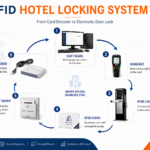
An electronic hotel lock normally works as part of a larger access system.
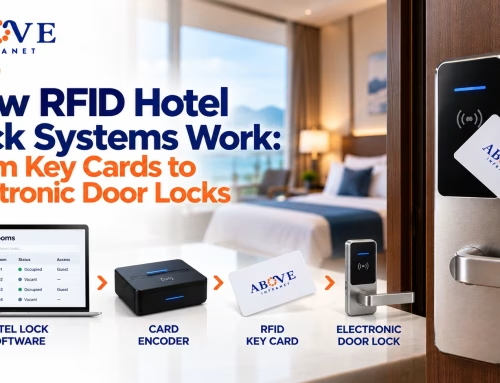
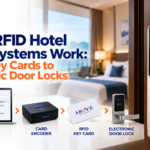
A typical setup may look like:
Hotel Lock Software → Card Encoder → RFID Key Card → Electronic Door Lock
The lock on the door is only one component.
Before installation, confirm what is included in the project:
Electronic locks
Lock management software
Card encoder
RFID cards
Staff credentials
Mechanical override keys
Programming or maintenance tools
Required workstation or computer
Optional energy-saving switches
Integration components, if needed
Hotels should avoid buying hardware first and figuring out the software later.
The components need to be compatible from the beginning.
4. Check How the Front Desk Will Use the System
The front desk will probably interact with the system every day.
The workflow should therefore be simple enough for staff to use during busy check-in periods.
A normal process may involve:
Selecting the guest room
Setting the stay period
Preparing the key card
Giving the credential to the guest
The system should also make common situations manageable, including:
Lost cards
Additional guest cards
Room changes
Extended stays
Early check-outs
Staff cards
A technically capable system can still cause problems if routine front desk tasks are difficult or confusing.
5. Plan Guest and Staff Access Separately
Guest access is only one part of hotel operations.
Employees may also need access to guest rooms or restricted areas.
This can include:
Housekeeping
Maintenance
Supervisors
Security
Management
A good access plan should define what each role actually needs.
For example, a housekeeping credential may need access to selected rooms or floors, while a maintenance credential may require access to additional technical areas.
Not everyone needs the same permissions.
Planning this before installation makes the final system easier to configure and manage.
6. Understand What Happens When a Card Is Lost
Hotels should know exactly how replacement credentials work.
The same lock may not be suitable for every property.
Resorts and coastal hotels may have additional environmental concerns, including:
Humidity
Salt air
Outdoor exposure
Temperature changes
Frequent door use
Properties with villas or multiple buildings may also have very different deployment requirements from a single-building city hotel.
The hardware should be selected based on where it will actually be installed.
13. Plan for Expansion
Hotels change over time.
A property may later add:
More guest rooms
New floors
Additional buildings
More front desk stations
Additional staff
More access areas
Mobile credentials
New hotel software
Before installation, ask whether the lock system can support reasonable expansion.
It is usually easier to plan scalability at the beginning than to replace the access platform later because it cannot support new requirements.
14. Check the Availability of Cards and Spare Parts
An electronic lock system becomes difficult to maintain if compatible parts are hard to obtain.
Ask the provider about:
RFID card availability
Replacement locks
Handles and mortises
Card encoders
Batteries
Programming devices
Other replacement components
Hotels should also understand whether replacement parts are available locally or need to be ordered from another country.
Downtime matters when the affected door belongs to a room that should be available for guests.
15. Ask About Installation, Testing, and Training
Installation should not end when the last lock is mounted.
The system should be tested as part of the deployment.
Testing may include:
Guest card issuance
Correct room access
Expired card behavior
Staff credential permissions
Lost-card replacement
Room changes
Emergency access
Low-battery behavior
Software operation
Front desk and maintenance teams should also receive enough training to handle normal daily situations.
A good installation should leave the hotel capable of operating the system, not completely dependent on a technician for every small issue.
16. Look Beyond the Lowest Price
Price matters, especially when a project involves many rooms.
But hotel operators should compare the complete scope.
A lower quotation may not include:
Card encoder
Lock software
Installation
Door modifications
Training
Spare cards
Replacement parts
Integration
Technical support
The better comparison is not simply:
Price per lock
It is:
Complete System + Installation + Support + Maintenance + Long-Term Usability
A Practical Pre-Installation Checklist
Before approving an electronic hotel lock project, confirm:
Door compatibility has been checked
Lock model is suitable for the property
RFID card type is confirmed
Encoder is included and compatible
Lock management software is included
Guest access workflow is clear
Staff access levels are defined
Lost-card procedures are understood
Emergency access is available
Battery maintenance is planned
PMS compatibility is verified if required
Internet/network requirements are understood
Replacement parts are available
Future expansion has been considered
Installation testing is included
Staff training is provided
After-sales support is clear
If several of these questions still have no answer, the property probably needs more planning before installation.
Frequently Asked Questions
Do electronic hotel locks need Wi-Fi?
Not always. Many RFID hotel locks can validate credentials locally. Network requirements depend on the specific platform and features being used.
Can existing hotel doors be upgraded to electronic locks?
Often yes, but door compatibility should be inspected first. Door thickness, material, existing cutouts, mortise requirements, and frame condition can affect installation.
What happens if an RFID hotel lock battery dies?
The exact procedure depends on the model. Hotels should confirm low-battery warnings and emergency access procedures before installation.
Can electronic hotel locks integrate with a PMS?
Some systems can integrate with compatible property management platforms. Compatibility and supported functions should be verified before purchasing.
Should hotels use RFID cards or mobile keys?
It depends on the property. RFID cards remain practical for many hotels. Mobile access can add convenience but may require additional technology and integrations.
How many spare cards should a hotel keep?
There is no universal number. It depends on room count, guest turnover, staff credential requirements, replacement frequency, and how quickly additional compatible cards can be obtained.
Plan the System Before Installing the Locks
The most important thing to remember is that an electronic hotel lock is not just a piece of door hardware.
It is part of a complete operating system:
Door Hardware + Electronic Locks + Credentials + Encoder + Software + Staff Procedures + Maintenance + Support
When these pieces are planned together, the hotel is in a much better position to avoid installation problems and create a room-access system that works naturally with daily operations.
For more information on how Above Infranet Solutions Inc can help you with What to Consider Before Installing an Electronic Hotel Lock System, please contact us at [0917 715 4189 (line 9177154189)](tel:09177154189), or visit us here: