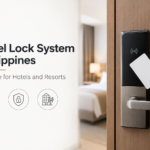
Beyond the Door Lock: Understanding the Complete Electronic Hotel Lockset Solution
An electronic hotel lockset solution is more than the lock installed on a guest room door. It is a complete access system that connects hotel software, a card encoder, RFID key cards, electronic locks, staff credentials, energy-saving devices, backup access, maintenance, and technical support.
For guests, the experience is simple: receive a card, tap it near the lock, and enter the room. For the hotel, several components must work together correctly to make that experience secure and reliable.
Quick Summary
A complete electronic hotel lockset solution typically includes:
Lock management software
RFID card encoder
Guest and staff key cards
Electronic hotel door locks
Energy-saving switches
Mechanical override access
Batteries and spare components
Installation, configuration, training, and maintenance
The door lock is only the visible part of the system.
Why Hotels Should Look Beyond the Door Lock
A hotel may install a modern electronic lock, but the system can still fail if the card encoder is incompatible, the software is configured incorrectly, the staff are not trained, or the batteries are not maintained.
Before a guest can enter a room, the hotel must:
Assign the correct room.
Set the valid access period.
Encode the RFID card.
Issue the card to the guest.
Ensure the lock recognizes the credential.
Maintain the lock hardware and batteries.
Provide a clear process for lost cards and emergency access.
This is why hotels should evaluate the complete solution rather than choosing a lock based only on appearance.
What Is a Complete Electronic Hotel Lockset Solution?
A complete electronic hotel lockset solution is a coordinated system used to create, issue, verify, and manage access for hotel guests and staff.
Depending on the property, the system may include:
Front-desk lock management software
Card encoders
RFID guest key cards
Staff access cards
Electronic hotel door locks
Energy-saving switches
Handheld programming devices
Mechanical override keys
Batteries and spare parts
Installation and system configuration
Staff training
Technical support and maintenance
The exact setup depends on the number of rooms, door condition, operating process, staff access requirements, and selected equipment.
How the Complete System Works
The typical access flow is:
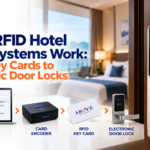
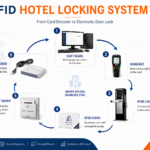
Room assignment → Lock software → Card encoder → RFID card → Electronic door lock → Guest access
1. The front desk assigns the room
Hotel staff select the guest’s room in the lock management software.
They may also set:
Check-in time
Check-out time
Card type
Guest or staff access level
Permitted rooms or areas
The software creates the access instructions for the key card.
2. The card encoder prepares the RFID card
The card encoder receives the room and access details from the software and writes them onto a compatible RFID card.
The encoder does not unlock the door. Its role is to prepare the credential that the electronic lock will later read.
3. The guest receives the card
The encoded card is issued to the guest at check-in.
The card normally does not need to display the guest’s name or room number, which reduces visible room information if it is misplaced.
4. The electronic lock checks the credential
At the room door, the guest holds the card near the RFID reader.
The lock may check:
Whether the card is assigned to the correct room
Whether the access period is still valid
Whether the credential is recognized
Whether the card type is permitted
If the card is accepted, the lock releases the door mechanism.
The Main Components Hotels Should Understand
Lock Management Software
The lock management software acts as the control center of the system.
Hotel staff may use it to:
Set up room information
Prepare guest key cards
Create staff cards
Set access periods
Manage user permissions
Replace lost cards
Support lock configuration and maintenance
Access to the software should be limited to authorized personnel. Reception staff, supervisors, and administrators may require different permission levels.
RFID Card Encoder
The encoder connects the software to the physical RFID card.
Before purchasing extra cards or replacement equipment, hotels should confirm compatibility between:
Lock management software
Card encoder
RFID cards
Electronic lock model
Energy-saving switch, when included
An unsupported card or encoder may result in failed encoding or a card that the lock cannot recognize.
Guest RFID Key Cards
The RFID card carries the guest’s access credential.
Unlike a traditional key, the card can be prepared for a specific room and valid access period.
The guest simply holds the card near the electronic lock instead of inserting it into a keyhole.
Staff Access Cards
Hotels may also issue RFID cards to:
Housekeeping personnel
Maintenance staff
Supervisors
Security personnel
Managers
System administrators
Staff access should match each employee’s responsibilities.
For example, a housekeeping card may cover assigned rooms, while a maintenance card may only be used for rooms requiring service.
Not every employee should have the same access level.
Electronic Hotel Door Locks
The electronic lock reads the card and controls the physical door.
A typical hotel lockset may include:
RFID reader
Electronic control components
Handle
Mortise or locking mechanism
Battery compartment
Indicator light or sound
Mechanical override cylinder, depending on the model
The lock must also match the physical door.
Before installation, the property should inspect:
Door thickness
Door material
Frame condition
Existing lock cutouts
Mortise size
Handle position
Door alignment
A modern lock may still perform poorly if the door is damaged or incorrectly prepared.
Energy-Saving Switches
Some hotels use the RFID card with an energy-saving switch inside the room.
When the guest inserts the card, the switch may activate selected:
Lighting
Air-conditioning controls
Electrical outlets
Room circuits
When the card is removed, selected power may turn off after a short delay.
The energy saver and electronic door lock are separate devices, even when they use the same card.
Handheld Programming Devices
Some locking systems use a handheld device for setup, testing, or maintenance.
Depending on the selected system, it may help technical staff:
Configure locks
Transfer room information
Test lock operation
Support troubleshooting
Collect lock-related information
Hotels should confirm whether this device is required before installation.
Mechanical Override Access
Electronic locks still need a controlled backup access method.
Many systems include a mechanical override key or another authorized emergency access option.
Override access should be:
Stored securely
Limited to authorized personnel
Documented when used
Kept separate from normal guest operations
Batteries and Spare Components
Many electronic hotel locks operate using batteries.
Hotels should plan for:
Routine battery inspection
Scheduled battery replacement
Low-battery warnings
Spare batteries
Replacement RFID cards
Spare lock components
Encoder and software support
Waiting until a lock stops working can delay room access and affect the guest experience.
What Happens When a Guest Loses a Card?
A lost card should be handled through a clear security procedure.
Hotel staff should:
Verify the guest’s identity.
Confirm the assigned room.
Prepare a replacement card.
Follow the locking system procedure for the previous credential.
Record the incident when required.
The exact method for replacing or invalidating the old card depends on the selected system.
Replacement cards should never be issued without confirming that the requester is authorized to access the room.
Can Electronic Hotel Locks Connect With Hotel Software?
Some electronic hotel locking systems may connect with compatible hotel management or Property Management System software.
When supported, integration can help connect room assignment, guest check-in, and key-card preparation with the hotel’s front-desk workflow. This may reduce repeated data entry and help staff manage room access more efficiently.
Hotels may also explore Jinisys hotel management software to understand how front-desk operations, room management, reporting, and other hotel processes can work within a broader hospitality technology setup.
Compatibility depends on:
Lock brand and model
Lock software version
Hotel management platform
Available interface or connector
Supported workflow
Installation configuration
Hotels should verify the exact products and software versions before purchasing equipment or describing two systems as integrated.
Common Problems Caused by Incomplete Planning
Many hotel lock problems are not caused by the electronic lock alone.
Common issues include:
Unsupported RFID cards
Incorrect room configuration
Poor staff training
Misaligned doors
Low lock batteries
Incompatible card encoders
Missing replacement cards
Unsupported software integration
Weak emergency procedures
Unclear maintenance responsibilities
These problems can often be reduced through proper assessment, installation, testing, training, and maintenance planning.
What Hotels Should Check Before Installation
Door condition and compatibility
Inspect every door that will receive a new lock.
Number of rooms
Room count affects the quantity of locks, cards, encoders, batteries, and spare parts required.
Front-desk workflow
Identify where the software and encoder will be installed and which employees will use them.
Staff access requirements
Define which employees need access and which rooms or areas they may enter.
Card quantity
Plan for guest cards, staff cards, replacements, testing, and future expansion.
Energy saver requirements
Decide whether energy-saving switches are needed and which electrical circuits they will control.
Network requirements
Standalone locks may work without continuous internet access. Online or integrated systems may require local network or internet connectivity.
Maintenance responsibilities
Assign responsibility for battery checks, lock inspection, card replacement, software support, and troubleshooting.
Staff training
Reception, housekeeping, maintenance, security, and management teams should understand their responsibilities.
Technical support
Confirm who will provide installation, configuration, spare parts, repairs, and after-sales support.
Choosing the Right Setup for the Property
Not every hotel requires the same system.
A smaller hotel may need:
Standalone RFID locks
One card encoder
Guest and staff cards
Basic lock management software
A simple battery-maintenance plan
A larger hotel or resort may require:
Multiple card encoders
Several staff access levels
Energy-saving switches
Common-area access
Handheld programming equipment
Additional spare components
Possible hotel software integration
The right system should match the property’s actual workflow, not only the appearance of the lock.
Frequently Asked Questions
Is an electronic hotel lockset only the lock on the door?
No. A complete solution includes software, encoders, RFID cards, staff credentials, lock hardware, maintenance procedures, and emergency access.
Can any RFID card work with a hotel lock?
No. The RFID card must be compatible with the selected software, encoder, and electronic lock.
Do electronic hotel locks need internet access?
Not always. Standalone locks may work without continuous internet access, while online or integrated systems may require network connectivity.
Can the same card work with the door lock and energy saver?
Yes, when the card, lock, and energy-saving switch are compatible.
What happens when the lock battery runs low?
The hotel should replace the battery according to the manufacturer’s maintenance procedure before the lock stops operating.
Can hotel staff use RFID cards?
Yes. Staff cards can be configured for housekeeping, maintenance, supervisors, management, and other authorized roles.
Can electronic locks integrate with a hotel PMS?
Some systems may support PMS integration, but compatibility must be verified for the exact products, interfaces, and software versions.
Is a site inspection necessary?
Yes. The doors, front-desk setup, room count, electrical requirements, access needs, and maintenance plan should be reviewed before installation.
A guest may only notice the card and the door, but the hotel manages a complete access system behind them.
Reliable room access depends on the software, card encoder, RFID cards, locks, staff permissions, batteries, emergency procedures, maintenance, and training working together.
For hotels and resorts in Cebu, reviewing the full solution before installation can help reduce access problems and create a smoother process for guests and staff.
Talk to Above Infranet Solutions Inc.
Above Infranet Solutions Inc. provides electronic hotel lockset, access-control, communication, and infrastructure solutions for hotels, resorts, and commercial properties in Cebu.
A site assessment can help determine the appropriate lock configuration, door requirements, number of cards and encoders, staff access levels, maintenance plan, and possible integration requirements.