How an RFID Hotel Locking System Works: From Card Encoder to Electronic Door Lock
How an RFID Hotel Locking System Works: From Card Encoder to Electronic Door Lock
An RFID hotel locking system uses lock management software, a card encoder, RFID key cards, and electronic door locks to manage access to hotel rooms.
During check-in, hotel staff assign a room and prepare a guest key card using the system’s software and card encoder. The guest then presents the card near the reader on the electronic lock. If the card contains valid access information for that room, the door unlocks.
The basic process is:
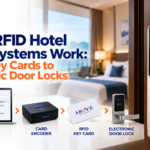
Hotel software → Card encoder → RFID key card → Electronic door lock
For guests, this process takes only a few seconds. For hotel staff, several connected components work together behind the scenes.
What Is an RFID Hotel Locking System?
RFID means Radio-Frequency Identification. It allows a card and a compatible reader to exchange information over a short distance without inserting the card into the lock.
An RFID hotel locking system typically includes:
Lock management software
Computer or front-desk workstation
Card encoder or card reader
RFID guest key cards
Electronic hotel door locks
Staff access cards
Mechanical override key
Optional energy-saving switch
Optional handheld device
Orbita offers hotel RFID locks, locking software, card-related equipment, energy-saving switches, and other hotel access products as part of its hotel technology range.
The exact components depend on the property’s size, selected lock model, and operational requirements.
How Does an RFID Hotel Locking System Work?
The system follows a series of steps from the front desk to the guest room.
Step 1: Hotel staff sign in to the lock management software
The process normally begins at a computer located at the reception or another authorized work area.
Hotel staff use the lock management software to handle room and card information. The software may be used to support tasks such as:
Setting up rooms
Preparing guest cards
Preparing staff cards
Managing system users
Recording card-related activity
Supporting lock maintenance tasks
Orbita’s hotel locking software uses a USB connection for compatible card encoders or readers. Some versions may also require a network connection for web-based use.
Access to the software should be limited to authorized hotel personnel.
Step 2: The guest’s room is selected
When a guest checks in, the front desk selects the assigned room in the locking system.
The staff member may also enter or confirm information required by the system, such as:
Room number
Check-in schedule
Expected check-out schedule
Card type
Guest or staff access category
The available settings depend on the lock software and the hotel’s configuration.
This step connects the guest’s key card to the correct room access instructions.
Step 3: The card encoder prepares the RFID card
The card encoder is a device connected to the front-desk computer.
After the room details are selected, the hotel employee places or presents a compatible RFID card to the encoder. The encoder then writes the required access information to the card.
Orbita describes its contactless card reader as a device that can connect to a computer through a USB interface.
The encoder does not physically unlock the room. Its role is to prepare the card that will communicate with the electronic lock.
Step 4: The RFID key card is given to the guest
Once the card has been prepared, the front desk gives it to the guest.
The hotel should clearly explain:
The assigned room number
How to present the card to the lock
What to do if the card does not work
Where to report a lost card
Whether the same card is used with an energy saver
The card should be handled like any other room access credential. Guests should avoid giving it to unauthorized individuals.
Step 5: The guest presents the card to the electronic lock
At the room door, the guest holds the RFID card near the lock reader.
The card usually does not need to touch the lock directly. It only needs to be placed within the reader’s working range.
The electronic lock reads the card and checks whether its access information is acceptable for that door.
Step 6: The electronic door lock checks the credential
The lock compares the information on the card with the access rules stored or recognized by the locking system.
The lock may check whether:
The card is for the correct room
The credential is recognized
The access period is valid
The card type is permitted
The lock can complete the request
If the credential is accepted, the lock releases the door mechanism. If the credential is not accepted, the door remains locked.
The exact validation process depends on the selected lock model and system configuration.
Step 7: The guest opens the door
After the lock accepts the card, the guest presses or turns the handle and enters the room.
The entire guest-side process is straightforward:
Present card → Wait for confirmation → Open door
The more detailed work happens at the front desk, where the software, encoder, and card are prepared.
What Does the Card Encoder Do?
A hotel card encoder prepares compatible RFID cards for use with the electronic locking system.
It acts as the connection between the lock management software and the physical key card.
Its main role is to:
Receive instructions from the lock software.
Read or write information on a compatible RFID card.
Prepare the card for the selected room or access type.
Confirm that the encoding process has been completed.
The card encoder should be installed in a controlled location, normally at the reception desk or hotel administration office.
Hotel staff should also avoid using unapproved cards or encoders because system compatibility can vary between manufacturers and lock models.
What Information Does an RFID Hotel Card Carry?
An RFID hotel key card carries electronic access data that the compatible lock can read.
Depending on the system, this may relate to:
Assigned room
Access category
Card type
Valid access schedule
Staff access level
System identification
The card does not need to display the guest’s name or room number on its surface. This can help reduce the amount of visible room information if the card is misplaced.
However, the exact data structure is determined by the manufacturer and system configuration. Hotels should follow the supplier’s instructions rather than assuming that all RFID cards work in the same way.
What Happens When a Guest Loses a Key Card?
When a guest reports a lost RFID card, hotel staff can prepare a replacement using the lock management system and card encoder.
The hotel should follow its established security procedure, which may include:
Verifying the guest’s identity.
Confirming the assigned room.
Preparing a replacement card.
Following the system procedure for handling the previous credential.
Recording the incident when required.
How an older card is cancelled, replaced, or affected by a newer credential depends on the locking system’s configuration.
Staff should not simply issue a replacement without confirming the identity of the person making the request.
How Are Staff Access Cards Different?
Hotels may also prepare cards for housekeeping, maintenance personnel, supervisors, and management.
Staff access should be based on job requirements.
For example:
A guest card may be limited to one room.
A housekeeping card may cover an assigned group of rooms.
A maintenance card may be prepared for rooms requiring service.
A supervisor card may have broader access.
A management card may support authorized operational tasks.
Hotels should avoid giving every employee the same level of access.
A role-based approach makes it easier to limit access to the rooms or areas each employee needs for work.
How Does an Energy Saver Work With the RFID Card?
Some hotels use an energy-saving switch inside the guest room.
After entering, the guest inserts a compatible card into the energy saver. Based on the system design, this can activate selected room circuits or electrical services.
When the guest removes the card, the system may turn off selected power after a configured delay.
Orbita lists energy-saving switches among the components available for its hotel solutions.
The energy saver is separate from the door lock, even when the same type of card is used for both.
Hotels should confirm which electrical systems will be connected and ensure that installation follows proper electrical and safety requirements.
Does an RFID Hotel Lock Need Internet Access?
A standalone RFID hotel lock may continue reading properly prepared cards without requiring a continuous internet connection at the door.
However, the complete system may still require:
A computer for lock management software
USB connectivity for the card encoder
A local network for certain software setups
Internet or network connectivity for online or integrated systems
The requirement depends on whether the hotel uses standalone locks, wireless online locks, Bluetooth-enabled locks, or another system type.
Hotels should confirm the required network setup before purchasing the equipment.
Why the Complete System Matters
The electronic lock is only one part of the hotel access process.
A reliable setup depends on several parts working together:
Component
Main purpose
Lock management software
Supports room and credential management
Card encoder
Prepares compatible RFID cards
RFID key card
Carries the guest or staff access credential
Electronic door lock
Reads the credential and controls the door
Energy saver
Supports selected room power controls
Mechanical override
Provides an alternative access method for authorized situations
A problem with one part can affect the whole process.
For example, a good electronic lock cannot operate as intended if:
The card is incompatible.
The encoder is not properly connected.
The room was selected incorrectly.
The software was not configured correctly.
The door and lock hardware do not align.
Staff have not been trained to use the system.
This is why system planning, installation, configuration, and staff training are all important.
What Should Hotels Check Before Installation?
Hotels and resorts should review the following before selecting an RFID hotel lock system in Cebu:
Door condition and compatibility
The current door, frame, thickness, mortise, handle position, and existing cutouts should be inspected.
Number of rooms
The number of guest rooms affects the quantity of locks, cards, spare components, and other equipment needed.
Front-desk setup
The property should determine where the computer, software, and card encoder will be installed.
Staff access requirements
The hotel should identify which employees need access and which rooms or areas they should be allowed to enter.
Key card quantity
Hotels need enough cards for guests, staff, replacements, testing, and future use.
Power and battery maintenance
Electronic hotel locks often use batteries, so the property needs a procedure for checking and replacing them according to the manufacturer’s guidance.
Energy saver requirements
The property should decide whether room energy-saving switches are included and what circuits they will control.
Technical support
Hotels should confirm who will handle installation, system configuration, training, maintenance, and troubleshooting.
Electronic hotel locks may form part of a wider hospitality technology setup when compatible integration is available.
Hotel management software can support front-desk processes such as guest registration, room assignment, check-in, and check-out. A compatible lock integration may help connect parts of the access process with hotel operations.
Compatibility should always be confirmed before installation. Hotels should check the exact lock model, software version, required interface, and supported workflow.
How RFID Hotel Locking Systems Support Cebu Hotels
Hotels and resorts in Cebu range from small properties to large hospitality developments. Their room access requirements are not always the same.
A small hotel may need:
Standalone RFID locks
One front-desk encoder
Basic guest and staff cards
A simple maintenance process
A larger hotel or resort may need:
More card encoders
Several staff access levels
Energy-saving switches
Common-area access
Lock management across many rooms
Possible hotel software integration
A site assessment can help determine which setup matches the property instead of choosing equipment based only on appearance.
Above Infranet provides electronic door lockset and access-control solutions for hotel and business environments in Cebu. Its service page describes support for key cards, access records, installation, and centralized management options.
Frequently Asked Questions
What is a hotel card encoder?
A hotel card encoder is a device used to prepare compatible RFID key cards. It receives room access instructions from the lock management software and writes the required information to the card.
Can any RFID card open a hotel door?
No. The card must be compatible with the selected locking system and prepared with valid access information. A random RFID card should not open the lock.
Can one guest card open several rooms?
It may be possible when the system is configured to allow it, but normal guest cards are usually prepared according to the room access assigned by the hotel.
What should staff do when a guest loses a card?
Staff should verify the guest’s identity, confirm the room assignment, issue a replacement card, and follow the locking system’s procedure for handling the previous credential.
Does every hotel room need an internet connection?
Not necessarily. Standalone RFID locks may read prepared cards without continuous internet access. Online and integrated lock systems may require additional network connectivity.
Can an RFID card work with an energy saver?
Yes, when the card and energy-saving switch are compatible. The guest may insert the card into the energy saver to activate selected room power services.
Is a mechanical key still needed?
Many electronic hotel lock systems include a mechanical override option for authorized maintenance or emergency use. The override key should be kept in a secure and controlled location.
Conclusion
An RFID hotel locking system works by connecting four main parts: the lock management software, card encoder, RFID key card, and electronic door lock.
The software prepares the access instructions. The encoder writes them to the card. The guest presents the card to the lock, and the lock checks whether access is valid.
For hotels and resorts in Cebu, the right system should match the property’s doors, room count, front-desk workflow, staff access needs, maintenance plan, and future integration requirements.
Planning an RFID hotel lock system requires more than selecting a door lock. The doors, software, card encoder, RFID cards, staff access levels, energy savers, and maintenance requirements should be considered as one system.
Above Infranet Solutions Inc. provides electronic hotel lockset, access-control, communication, and infrastructure solutions for hotels, resorts, and businesses in Cebu.